 Parrot Cart plugins
SMS.CVPOn the TV
These are the author’s screenshots, shown pixel for pixel.
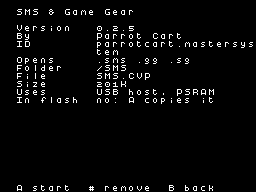
256 × 192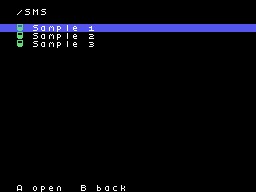
256 × 192README on the cart
This is what the cart shows for this plugin. It’s 122 lines long and 30 characters wide.
2,562 bytesPlain text
SMS & GAME GEAR

This plugin plays Sega Master
System and Game Gear games on
the ColecoVision. It plays
SG-1000 games too.

SETUP

Copy SMS.CVP into the /PLUGINS
folder on the card. Put your
.sms, .gg and .sg files in
/SMS, or anywhere else on the
card. Pick one in the menu to
play it.

USB pads need a powered hub on
the cart's USB port, because
the cart can't power them. A
Switch Pro Controller or a
plain HID pad works.

CONTROLS

On the ColecoVision
controller:

- The joystick is the D-pad.
- Left fire is button 1, and
  right fire is button 2.
- Keypad # is Pause. On a Game
  Gear game it's Start.
- Keypad 0 switches between
  smooth scrolling and
  scrolling by tiles.
- Keypad 1 switches the
  background between the
  game's colors, gray, and
  off.
- Hold keypad 7 for a second
  to save a state, or 9 to
  load it.
- Press RESET on the console
  to go back to the menu.

On a USB pad:

- The D-pad or the left stick
  is the D-pad.
- The bottom face button is
  button 1, and the right one
  is button 2.
- Plus is Pause, or Start on a
  Game Gear game.
- R switches the scrolling,
  and L switches the
  background.
- Hold ZL for a second to save
  a state, or ZR to load it.

The first pad plays along with
the console's controller as
player 1. A second pad is
player 2.

SAVES

- Battery saves go next to the
  game, with the same name, so
  Phantasy Star.sms saves to
  Phantasy Star.sav. The cart
  writes them as the game
  changes them and when you
  press RESET.
- A save state holds the whole
  console. It goes next to the
  game as a .state file, one
  for each game.
- While you hold 7 or 9, the
  border turns yellow. Then it
  turns green when the state
  is saved, cyan when it's
  loaded, or red if it didn't
  work.

NOTES

- There's no FM sound, so
  games play their regular
  music instead.
- Game Gear stereo, the Light
  Phaser, paddles, the Sports
  Pad and 3-D glasses aren't
  supported.

CREDITS

- SMS Plus by Charles
  MacDonald, under the
  GPL-2.0-or-later.
- pico-smsplus, the Pico port
  by Frank Hoedemakers, under
  the GPL-3.0. The source used
  here is at
  https://github.com/PicoPlus-
  devel/pico-smsplus
- SG-1000 support (tms.c) from
  SMS Plus GX, under the
  GPL-2.0.
- The Z80 core by Juergen
  Buchmueller, from MAME, free
  for non-commercial use.
- TinyUSB by Ha Thach, under
  the MIT license. The source
  is at
  https://github.com/hathach/t
  inyusb
- The plugin itself is by
  Parrot Cart. As a whole it's
  under the GPL-3.0, and it's
  free. Its full source is
  linked next to its download.
README
This is the README.md from release v0.2.5. Images show up as links.
SMS & Game Gear
This plugin plays Sega Master System and Game Gear games on the ColecoVision. It plays SG-1000 games too.
Setup
Copy SMS.CVP into the /PLUGINS folder on the card. Put your .sms, .gg and .sg files in /SMS, or anywhere else on the card. Pick one in the menu to play it.
USB pads need a powered hub on the cart’s USB port, because the cart can’t power them. A Switch Pro Controller or a plain HID pad works.
Controls
On the ColecoVision controller:
- The joystick is the D-pad.
- Left fire is button 1, and right fire is button 2.
- Keypad # is Pause. On a Game Gear game it’s Start.
- Keypad 0 switches between smooth scrolling and scrolling by tiles.
- Keypad 1 switches the background between the game’s colors, gray, and off.
- Hold keypad 7 for a second to save a state, or 9 to load it.
- Press RESET on the console to go back to the menu.
On a USB pad:
- The D-pad or the left stick is the D-pad.
- The bottom face button is button 1, and the right one is button 2.
- Plus is Pause, or Start on a Game Gear game.
- R switches the scrolling, and L switches the background.
- Hold ZL for a second to save a state, or ZR to load it.
The first pad plays along with the console’s controller as player 1. A second pad is player 2.
Saves
- Battery saves go next to the game, with the same name, so
Phantasy Star.smssaves toPhantasy Star.sav. The cart writes them as the game changes them and when you press RESET. - A save state holds the whole console. It goes next to the game as a
.statefile, one for each game. - While you hold 7 or 9, the border turns yellow. Then it turns green when the state is saved, cyan when it’s loaded, or red if it didn’t work.
Notes
- There’s no FM sound, so games play their regular music instead.
- Game Gear stereo, the Light Phaser, paddles, the Sports Pad and 3-D glasses aren’t supported.
Credits
- SMS Plus by Charles MacDonald, under the GPL-2.0-or-later.
- pico-smsplus, the Pico port by Frank Hoedemakers, under the GPL-3.0. The source used here is at https://github.com/PicoPlus-devel/pico-smsplus
- SG-1000 support (tms.c) from SMS Plus GX, under the GPL-2.0.
- The Z80 core by Juergen Buchmueller, from MAME, free for non-commercial use.
- TinyUSB by Ha Thach, under the MIT license. The source is at https://github.com/hathach/tinyusb
- The plugin itself is by Parrot Cart. As a whole it’s under the GPL-3.0, and it’s free. Its full source is linked next to its download.
Build it yourself
You need the Raspberry Pi Pico SDK 2.1.1, an Arm GNU toolchain, CMake, Ninja, Python 3, sjasmplus and picotool. Releases are built with the Arm GNU Toolchain 9-2019-q4 (GCC 9.2.1) and picotool 2.3.1. With those you get the same file, byte for byte.
cmake -B build -G Ninja -DPICO_SDK_PATH=$HOME/pico-sdk
ninja -C build
This makes build/SMS.CVP. Copy it into the /PLUGINS folder on the card.
On Ubuntu, tools/ci/setup.sh installs the same tools that GitHub uses to
build each release.
CART-README.md is the text the cart shows on the plugin’s page. It is
the start of this README.
License
The plugin is under the GNU GPL, version 3 (LICENSE). THIRD-PARTY.md
lists the parts that came from elsewhere, and their licenses.
Release details
We read these from GitHub when the plugin was listed.
- Release
v0.2.5, 2026-11-19- Image
- 202,240 bytes, loaded into RAM
- Plugin API
1- Source
- Code at
v0.2.5 - Credits
- SMS Plus by Charles MacDonald, under the GPL-2.0-or-later.; pico-smsplus, the Pico port by Frank Hoedemakers, under the GPL-3.0. The source used here is at https://github.com/PicoPlus-devel/pico-smsplus; SG-1000 support (tms.c) from SMS Plus GX, under the GPL-2.0.; The Z80 core by Juergen Buchmuell…
- SHA-256
- 59f6d0f9402f26d57fc187f9cbd6426d79f1bd1a3ce9bb9c1c5caa5dc03c3693
The code
Every plugin here has a public repo on GitHub, so you can read how it works.
Release notes
The newest version is first.
Put it on your cart
Download SMS.CVP
The SHA-256 is above if you want to check the file.
Copy it to /PLUGINS
That folder is on the cart’s microSD card.
Put your files in /SMS
Your .sms .gg .sg files go in this folder.
Start it
Pick one of your files on the SD card and press A.