 Parrot Cart plugins
SCUMM.CVPOn the TV
These are the author’s screenshots, shown pixel for pixel.
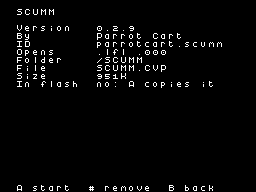
256 × 192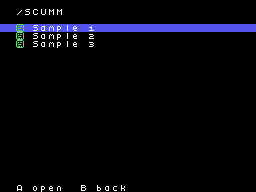
256 × 192README on the cart
This is what the cart shows for this plugin. It’s 163 lines long and 30 characters wide.
3,402 bytesPlain text
SCUMM

This plugin plays SCUMM
adventure games on the
ColecoVision, such as The
Secret of Monkey Island. It
runs ScummVM's SCUMM engine.

SETUP

Copy SCUMM.CVP into the
/PLUGINS folder on the card.
Copy each game's folder onto
the card, in /SCUMM or
anywhere else. To play, pick
the game's 000.LFL file in the
menu, or MONKEY2.000 for
Monkey Island 2.

A USB mouse and keyboard work
too. They need a powered hub
on the cart's USB port.

CONTROLS

On the ColecoVision
controller:

- The joystick moves the
  pointer. It speeds up as you
  hold it.
- Left fire and right fire are
  the left and right mouse
  buttons.
- Keypad * is Esc, which skips
  a cutscene.
- Keypad 0 skips a line of
  talk.
- Keypad 4 and 6 move the view
  left and right, and it stays
  there.
- Keypad 5 centers the view
  and lets it follow the
  pointer again.
- Keypad 1 shows the whole
  screen as one view. Press it
  again to give the verbs
  their own view.
- Hold keypad 7 for a second
  to save to slot 1, or 9 to
  load it.
- Hold keypad # for half a
  second to open the save and
  load screen.
- Press RESET on the console
  to go back to the menu.

On the save and load screen:

- Pick a slot with the
  joystick, or with keypad 0
  to 9.
- Left fire saves to the slot.
  If the slot has a save
  already, press left fire
  again to save over it.
- Right fire loads the slot.
  Press right fire again to be
  sure.
- Keypad # or * goes back to
  the game.

SAVES

- There are ten slots, kept in
  the game's folder as
  cart.s00 to cart.s09.
- Slot 0 is the autosave, made
  every 5 minutes. You can
  only load it.
- Slots 1 to 9 are yours.

NOTES

- The TV shows 256 by 192
  pixels of the game's 320 by
  200. The view follows the
  pointer.
- The verbs and inventory at
  the bottom have a view of
  their own, so they stay on
  screen when the room
  scrolls. When a game uses
  the whole screen for the
  room, as Fate of Atlantis
  does at the start, the
  plugin uses one view.
- Music and sound play on the
  console's sound chip.

HEAR THE MT-32 MUSIC ON YOUR
COMPUTER

The game's MT-32 music can
play on a computer. Get the
free Parrot Cart MIDI program
for macOS, Windows or Linux.
It's on GitHub at
plasticbugs/parrot-cart-midi.

1. Open Parrot Cart MIDI. Pick
   the folder with the ROMs
   from your CM-32L or MT-32.
2. Plug the cart's USB-C port
   into the computer.
3. Start the game.

If a Mac asks to allow the
accessory, click Allow. If the
TV says a computer is on the
USB port, press fire to play
without MIDI.

For a real MT-32, choose its
USB MIDI cable under Play on.

Older versions call the cart
MovieCart MIDI. Parrot Cart
MIDI finds either name.

With nothing plugged into the
USB-C port, the music plays on
the ColecoVision's sound chip.

CREDITS

- frank-quest by Mikhail
  Matveev, a port of ScummVM
  to the RP2350, under the
  GPL-3.0. The source is at
  https://github.com/rh1tech/f
  rank-quest
- The engine is Cabal, a
  community fork of ScummVM,
  by the ScummVM and Cabal
  authors, under the
  GPL-2.0-or-later. The source
  is at
  https://github.com/project-c
  abal/cabal
- The OPL emulator from MAME,
  under the LGPL-2.1.
- FatFs by ChaN, under a
  BSD-style license.
- TinyUSB by Ha Thach, under
  the MIT license. The source
  is at
  https://github.com/hathach/t
  inyusb
- The plugin itself is by
  Parrot Cart. Its full source
  is linked next to its
  download.
README
This is the README.md from release v0.2.9. Images show up as links.
SCUMM
This plugin plays SCUMM adventure games on the ColecoVision, such as The Secret of Monkey Island. It runs ScummVM’s SCUMM engine.
Setup
Copy SCUMM.CVP into the /PLUGINS folder on the card. Copy each game’s folder onto the card, in /SCUMM or anywhere else. To play, pick the game’s 000.LFL file in the menu, or MONKEY2.000 for Monkey Island 2.
A USB mouse and keyboard work too. They need a powered hub on the cart’s USB port.
Controls
On the ColecoVision controller:
- The joystick moves the pointer. It speeds up as you hold it.
- Left fire and right fire are the left and right mouse buttons.
- Keypad * is Esc, which skips a cutscene.
- Keypad 0 skips a line of talk.
- Keypad 4 and 6 move the view left and right, and it stays there.
- Keypad 5 centers the view and lets it follow the pointer again.
- Keypad 1 shows the whole screen as one view. Press it again to give the verbs their own view.
- Hold keypad 7 for a second to save to slot 1, or 9 to load it.
- Hold keypad # for half a second to open the save and load screen.
- Press RESET on the console to go back to the menu.
On the save and load screen:
- Pick a slot with the joystick, or with keypad 0 to 9.
- Left fire saves to the slot. If the slot has a save already, press left fire again to save over it.
- Right fire loads the slot. Press right fire again to be sure.
- Keypad # or * goes back to the game.
Saves
- There are ten slots, kept in the game’s folder as
cart.s00tocart.s09. - Slot 0 is the autosave, made every 5 minutes. You can only load it.
- Slots 1 to 9 are yours.
Notes
- The TV shows 256 by 192 pixels of the game’s 320 by 200. The view follows the pointer.
- The verbs and inventory at the bottom have a view of their own, so they stay on screen when the room scrolls. When a game uses the whole screen for the room, as Fate of Atlantis does at the start, the plugin uses one view.
- Music and sound play on the console’s sound chip.
Hear the MT-32 music on your computer
The game also has music for the Roland MT-32. The cart can send it out of its USB-C port to a computer, and the free Parrot Cart MIDI program plays it there, on an emulated MT-32. Get it for macOS, Windows or Linux from https://github.com/plasticbugs/parrot-cart-midi/releases
It needs the ROM files from a Roland CM-32L or MT-32 that you own. CM-32L ROMs are best, because the game uses sound effects that only the CM-32L has.
- Open Parrot Cart MIDI.
- macOS: open the app. The first time, macOS blocks it. Go to System Settings > Privacy & Security, and click Open Anyway.
- Windows: open
parrot-midi.exe. If Windows says it protected your PC, click More info, then Run anyway. - Linux: run
./parrot-midi.
- Click Choose ROM folder… and pick the folder with your ROM files.
- Plug the cart’s USB-C port into the computer.
- Start the game. The window says Connected to Parrot Cart MIDI, and the music plays on the computer.
Open the program before you start the game. The game sets up the MT-32’s instruments as it starts.
On a Mac with Apple silicon, macOS asks whether to allow the accessory to connect the first time you plug in the cart. Click Allow. This is macOS checking before a new USB device can talk to it. The cart only sends music. If you clicked Don’t Allow, unplug the cart, plug it in again, and click Allow. Until the computer allows the cart, the TV says that a computer is on the USB port. Press fire there to play without MIDI.
If you have a real MT-32 or CM-32L, connect it to the computer with a USB MIDI cable. In Parrot Cart MIDI, choose the cable under Play on. The program sends the music straight to it, so you don’t need ROMs.
Older versions of this plugin call the cart "MovieCart MIDI". Parrot Cart MIDI finds the cart by either name.
With nothing plugged into the cart’s USB-C port, the music plays on the ColecoVision’s sound chip.
Credits
- frank-quest by Mikhail Matveev, a port of ScummVM to the RP2350, under the GPL-3.0. The source is at https://github.com/rh1tech/frank-quest
- The engine is Cabal, a community fork of ScummVM, by the ScummVM and Cabal authors, under the GPL-2.0-or-later. The source is at https://github.com/project-cabal/cabal
- The OPL emulator from MAME, under the LGPL-2.1.
- FatFs by ChaN, under a BSD-style license.
- TinyUSB by Ha Thach, under the MIT license. The source is at https://github.com/hathach/tinyusb
- The plugin itself is by Parrot Cart. Its full source is linked next to its download.
Build it yourself
You need the Raspberry Pi Pico SDK 2.1.1, an Arm GNU toolchain, CMake, Ninja, Python 3, sjasmplus and picotool. Releases are built with the Arm GNU Toolchain 9-2019-q4 (GCC 9.2.1) and picotool 2.3.1. With those you get the same file, byte for byte.
This plugin uses the copy of TinyUSB that comes with the pico-sdk. Run
git submodule update --init lib/tinyusb in your pico-sdk folder first.
cmake -B build -G Ninja -DPICO_SDK_PATH=$HOME/pico-sdk
ninja -C build
This makes build/SCUMM.CVP. Copy it into the /PLUGINS folder on the card.
On Ubuntu, tools/ci/setup.sh installs the same tools that GitHub uses to
build each release.
CART-README.md is the text the cart shows on the plugin’s page. It is
the start of this README, with a shorter MIDI section.
License
The plugin is under the GNU GPL, version 3 (LICENSE). THIRD-PARTY.md
lists the parts that came from elsewhere, and their licenses.
Release details
We read these from GitHub when the plugin was listed.
- Release
v0.2.9, 2026-11-19- Image
- 969,216 bytes, runs from flash
- Plugin API
1- Source
- Code at
v0.2.9 - Credits
- frank-quest by Mikhail Matveev, a port of ScummVM to the RP2350, under the GPL-3.0. The source is at https://github.com/rh1tech/frank-quest; The engine is Cabal, a community fork of ScummVM, by the ScummVM and Cabal authors, under the GPL-2.0-or-later. The source is at https://github.com/project-ca…
- SHA-256
- 73aaaa55cab4178a055a4ada72c80875d05e60c05f6bc82cdea96a52a9389c2a
The code
Every plugin here has a public repo on GitHub, so you can read how it works.
Release notes
The newest version is first.
0.2.9
2026-11-19,
v0.2.9The first release.
- The verbs get their own view only in games that have a verb area. Games without one, such as Indiana Jones and the Fate of Atlantis in its opening, show the whole screen as one view.
- Keypad 1 shows the whole screen as one view. Press it again to give the verbs their own view.
- The cart now reads the console’s address lines twice, and answers only when the two agree. This is the bus loop that fixed the glitches in The Empire Strikes Back 0.1.4.
Put it on your cart
Download SCUMM.CVP
The SHA-256 is above if you want to check the file.
Copy it to /PLUGINS
That folder is on the cart’s microSD card.
Put your files in /SCUMM
Your .lfl .000 files go in this folder.
Start it
Pick one of your files on the SD card and press A.