 Parrot Cart plugins
Movies
Player for movies made with the movie converter
It’s built into the cart, so there’s nothing to download.
MOVIES.CVPOn the TV
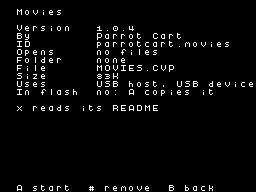
This is how it looks in the cart’s menu.
256 × 192README on the cart
This is what the cart shows for this plugin. It’s 58 lines long and 30 characters wide.
1,228 bytesPlain text
MOVIES

This plugin plays movies from
the SD card, with picture and
sound, at any length. It's
built into the Parrot Cart, so
there's nothing to install.

SETUP

A movie is a .rom file made
from a video with the movie
converter. You'll find it on
the Parrot Cart plugins site,
and it runs in your web
browser. Put your movies
anywhere on the card. Pick one
in the menu to play it.

The movie plays straight from
the card. If the card comes
out, the movie pauses. It
carries on when you put the
same card back in.

CONTROLS

- Press left fire to stop the
  movie and go back to the
  menu.
- Press RESET on the console
  to go back to the menu too.
- On a USB pad, press B or
  minus to stop the movie. B
  is the bottom face button.

USB pads need a powered hub on
the cart's USB port, because
the cart can't power them. A
pad stops the movie a moment
after you press it. If you're
already holding B when the
movie starts, let go and press
it again.

Some older movies can't be
stopped with left fire or a
pad. These are the ones made
as MegaCart files of 1 MB.
Press RESET to stop them.

CREDITS

- USB support comes from
  TinyUSB by Ha Thach, under
  the MIT license.
- The plugin and its video
  encoder are by Parrot Cart.
README
This is what the plugin does and how to use it.
Movies
This plugin plays movies from the SD card, with picture and sound, at any length. It’s built into the Parrot Cart, so there’s nothing to install.
Setup
A movie is a .rom file made from a video with the movie converter. You’ll find it on the Parrot Cart plugins site, and it runs in your web browser. Put your movies anywhere on the card. Pick one in the menu to play it.
The movie plays straight from the card. If the card comes out, the movie pauses. It carries on when you put the same card back in.
Controls
- Press left fire to stop the movie and go back to the menu.
- Press RESET on the console to go back to the menu too.
- On a USB pad, press B or minus to stop the movie. B is the bottom face button.
USB pads need a powered hub on the cart’s USB port, because the cart can’t power them. A pad stops the movie a moment after you press it. If you’re already holding B when the movie starts, let go and press it again.
Some older movies can’t be stopped with left fire or a pad. These are the ones made as MegaCart files of 1 MB. Press RESET to stop them.
Credits
- USB support comes from TinyUSB by Ha Thach, under the MIT license.
- The plugin and its video encoder are by Parrot Cart.
Details
This plugin is part of the cart’s firmware.
- Image
- 82,688 bytes, runs from flash
- Plugin API
1- Credits
- TinyUSB by Ha Thach
Release notes
The newest version is first.
1.0.4
2026-11-15,
v1.0.4Movies 1.0.4 is built into the cart.