 Parrot Cart plugins
NESINFO.CVPOn the TV
These are the author’s screenshots, shown pixel for pixel.
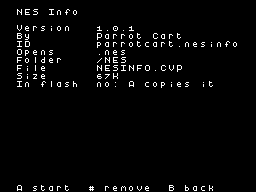
256 × 192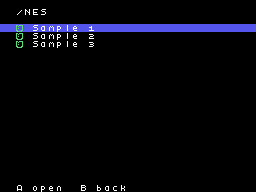
256 × 192README on the cart
This is what the cart shows for this plugin. It’s 64 lines long and 30 characters wide.
1,321 bytesPlain text
NES INFO

This plugin shows what a NES
game's file says about itself.
It doesn't play the game.

SETUP

Copy NESINFO.CVP into the
/PLUGINS folder on the card.
It opens .nes files in /NES or
anywhere else on the card.
Pick one in the menu to see
its details.

If the NES plugin is on the
card too, the menu asks which
one should open a .nes file.

CONTROLS

There are no controls. Pick a
.nes file in the menu and read
the screen. Press RESET on the
console to go back to the
menu. The menu comes back on
the same file, with the mapper
and CRC on its bottom line.

WHAT THE SCREEN SHOWS

- Mapper is the mapper's
  number and its usual name,
  such as MMC1.
- PRG ROM, CHR and PRG RAM are
  the sizes of the game's ROM
  and RAM. PRG RAM also says
  whether the game has a
  battery.
- Mirroring shows how the
  screen is mirrored, and
  whether there's a trainer.
- TV shows whether the game is
  for NTSC or PAL.
- Header shows whether the
  header is iNES or NES 2.0.
- File is the file's size. It
  turns red if the file is
  shorter than the header
  says.
- CRC-32 is the checksum of
  the ROM after its header,
  read through the whole file.
  It turns green when it's
  done.

NES Info is also the example
plugin in the cart's SDK.

CREDITS

NES Info is by Parrot Cart. It
uses no third-party emulator
or library.
README
This is the README.md from release v1.0.1. Images show up as links.
NES Info
This plugin shows what a NES game’s file says about itself. It doesn’t play the game.
Setup
Copy NESINFO.CVP into the /PLUGINS folder on the card. It opens .nes files in /NES or anywhere else on the card. Pick one in the menu to see its details.
If the NES plugin is on the card too, the menu asks which one should open a .nes file.
Controls
There are no controls. Pick a .nes file in the menu and read the screen. Press RESET on the console to go back to the menu. The menu comes back on the same file, with the mapper and CRC on its bottom line.
What the screen shows
- Mapper is the mapper’s number and its usual name, such as MMC1.
- PRG ROM, CHR and PRG RAM are the sizes of the game’s ROM and RAM. PRG RAM also says whether the game has a battery.
- Mirroring shows how the screen is mirrored, and whether there’s a trainer.
- TV shows whether the game is for NTSC or PAL.
- Header shows whether the header is iNES or NES 2.0.
- File is the file’s size. It turns red if the file is shorter than the header says.
- CRC-32 is the checksum of the ROM after its header, read through the whole file. It turns green when it’s done.
NES Info is also the example plugin in the cart’s SDK.
Credits
NES Info is by Parrot Cart. It uses no third-party emulator or library.
Build it yourself
You need the Raspberry Pi Pico SDK 2.1.1, an Arm GNU toolchain, CMake, Ninja, Python 3, sjasmplus and picotool. Releases are built with the Arm GNU Toolchain 9-2019-q4 (GCC 9.2.1) and picotool 2.3.1. With those you get the same file, byte for byte.
cmake -B build -G Ninja -DPICO_SDK_PATH=$HOME/pico-sdk
ninja -C build
This makes build/NESINFO.CVP. Copy it into the /PLUGINS folder on the card.
On Ubuntu, tools/ci/setup.sh installs the same tools that GitHub uses to
build each release.
CART-README.md is the text the cart shows on the plugin’s page. It is
the start of this README.
License
The plugin is under the MIT license (LICENSE). THIRD-PARTY.md lists
the parts that came from elsewhere, and their licenses.
Release details
We read these from GitHub when the plugin was listed.
- Release
v1.0.1, 2026-11-17- Image
- 66,304 bytes, loaded into RAM
- Plugin API
1- Source
- Code at
v1.0.1 - License
- MIT License
- Credits
- NES Info is by Parrot Cart. It uses no third-party emulator or library.
- SHA-256
- 04ca764abdc3c194fd15b260b62969bedbf4b0b42ef68594614ceb53122ac00a
The code
Every plugin here has a public repo on GitHub, so you can read how it works.
Release notes
The newest version is first.
1.0.1
2026-11-17,
v1.0.1
Put it on your cart
Download NESINFO.CVP
The SHA-256 is above if you want to check the file.
Copy it to /PLUGINS
That folder is on the cart’s microSD card.
Put your files in /NES
Your .nes files go in this folder.
Start it
Pick one of your files on the SD card and press A.