 Parrot Cart plugins
VECTREX.CVPOn the TV
These are the author’s screenshots, shown pixel for pixel.
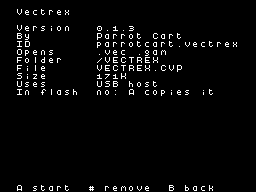
256 × 192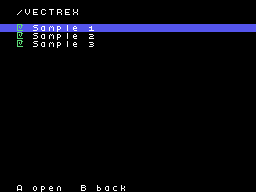
256 × 192README on the cart
This is what the cart shows for this plugin. It’s 114 lines long and 30 characters wide.
2,408 bytesPlain text
VECTREX

Vectrex games on the
ColecoVision. It opens .vec
and .gam files from anywhere
on the card; /VECTREX is its
home folder.

SETTING IT UP

1. VECTREX.CVP into the card's
   /PLUGINS folder.
2. The Vectrex's system ROM
   into /VECTREX. It is one 8K
   file, often named
   exec_rom.bin or Mine Storm
   (1982).vec. The name
   doesn't matter. Without it
   nothing runs, and the
   screen says so.
3. Games anywhere on the card,
   named .vec or .gam. Rename
   a game that ends in .bin.

Started from the Plugins page
with no game, it plays Mine
Storm, the game inside the
system ROM.

CONTROLS

On the ColecoVision
controller:

- Joystick: the stick
- Keypad 1, 2, 3, 4: buttons 1
  to 4
- Left fire: button 3
- Right fire: button 4
- Keypad 0: the picture's
  colour
- RESET on the console: back
  to the menu

On a USB pad:

- Left stick or D-pad: the
  stick
- Left face button (Nintendo
  Y): button 1
- Top face button (Nintendo
  X): button 2
- Bottom face button (Nintendo
  B): button 3
- Right face button (Nintendo
  A): button 4
- L: the picture's colour

NOTES

- USB pads need a powered hub
  on the cart's USB port. A
  Switch Pro Controller or a
  plain HID pad works. The
  first pad is player 1, with
  the console's controller.
  The second is player 2.
  Player 2 needs a USB pad.
- The picture stands upright
  in the middle of the screen,
  as the Vectrex's does. It is
  much coarser than the real
  one. Small text is redrawn a
  little larger so it can be
  read.
- The picture's colour stands
  in for a game's overlay:
  white, blue, green, yellow,
  red or magenta.
- Three voices and noise, as
  the Vectrex has. Its buzzing
  sounds become plain tones.
  Speech and samples play, a
  little rough.
- No 3-D Imager and no light
  pen. Games that need them
  don't work.
- Nothing is saved.

CREDITS

- The Vectrex's VIA, beam and
  cartridge follow MAME's
  Vectrex driver by Mathis
  Rosenhauer and others.
  BSD-3-Clause. Source:
  https://github.com/mamedev/m
  ame
- The 6809 was written for the
  cart's Star Wars plugin and
  checked against MAME's.
- MAME's licence text is in
  the plugin's source.
- TinyUSB by Ha Thach. MIT.
  Source:
  https://github.com/hathach/t
  inyusb
- The plugin itself is by
  Parrot Cart, and it's free.
  Its source is linked next to
  its download.
- It contains no Vectrex ROM.
  The system ROM and the games
  are yours to supply.
README
This is the README.md from release v0.1.3. Images show up as links.
Vectrex
Vectrex games on the ColecoVision. It opens .vec and .gam files from anywhere on the card; /VECTREX is its home folder.
Setting it up
VECTREX.CVPinto the card’s/PLUGINSfolder.- The Vectrex’s system ROM into
/VECTREX. It is one 8K file, often namedexec_rom.binorMine Storm (1982).vec. The name doesn’t matter. Without it nothing runs, and the screen says so. - Games anywhere on the card, named
.vecor.gam. Rename a game that ends in.bin.
Started from the Plugins page with no game, it plays Mine Storm, the game inside the system ROM.
Controls
On the ColecoVision controller:
- Joystick: the stick
- Keypad 1, 2, 3, 4: buttons 1 to 4
- Left fire: button 3
- Right fire: button 4
- Keypad 0: the picture’s colour
- RESET on the console: back to the menu
On a USB pad:
- Left stick or D-pad: the stick
- Left face button (Nintendo Y): button 1
- Top face button (Nintendo X): button 2
- Bottom face button (Nintendo B): button 3
- Right face button (Nintendo A): button 4
- L: the picture’s colour
Notes
- USB pads need a powered hub on the cart’s USB port. A Switch Pro Controller or a plain HID pad works. The first pad is player 1, with the console’s controller. The second is player 2. Player 2 needs a USB pad.
- The picture stands upright in the middle of the screen, as the Vectrex’s does. It is much coarser than the real one. Small text is redrawn a little larger so it can be read.
- The picture’s colour stands in for a game’s overlay: white, blue, green, yellow, red or magenta.
- Three voices and noise, as the Vectrex has. Its buzzing sounds become plain tones. Speech and samples play, a little rough.
- No 3-D Imager and no light pen. Games that need them don’t work.
- Nothing is saved.
Credits
- The Vectrex’s VIA, beam and cartridge follow MAME’s Vectrex driver by Mathis Rosenhauer and others. BSD-3-Clause. Source: https://github.com/mamedev/mame
- The 6809 was written for the cart’s Star Wars plugin and checked against MAME’s.
- MAME’s licence text is in the plugin’s source.
- TinyUSB by Ha Thach. MIT. Source: https://github.com/hathach/tinyusb
- The plugin itself is by Parrot Cart, and it’s free. Its source is linked next to its download.
- It contains no Vectrex ROM. The system ROM and the games are yours to supply.
Build it yourself
You need the Raspberry Pi Pico SDK 2.1.1, an Arm GNU toolchain, CMake, Ninja, Python 3, sjasmplus and picotool. Releases are built with the Arm GNU Toolchain 9-2019-q4 (GCC 9.2.1) and picotool 2.3.1. With those you get the same file, byte for byte.
cmake -B build -G Ninja -DPICO_SDK_PATH=$HOME/pico-sdk
ninja -C build
This makes build/VECTREX.CVP. Copy it into the /PLUGINS folder on the card.
On Ubuntu, tools/ci/setup.sh installs the same tools that GitHub uses to
build each release.
CART-README.md is the text the cart shows on the plugin’s page. It is
the start of this README.
License
The plugin is under the BSD 3-Clause license (LICENSE). THIRD-PARTY.md
lists the parts that came from elsewhere, and their licenses.
Release details
We read these from GitHub when the plugin was listed.
- Release
v0.1.3, 2026-11-18- Image
- 171,776 bytes, loaded into RAM
- Plugin API
1- Source
- Code at
v0.1.3 - Credits
- The Vectrex’s VIA, beam and cartridge follow MAME’s Vectrex driver by Mathis Rosenhauer and others. BSD-3-Clause. Source: https://github.com/mamedev/mame; The 6809 was written for the cart’s Star Wars plugin and checked against MAME’s.; MAME’s licence text is in the plugin’s source.; TinyUSB by Ha…
- SHA-256
- db7034d91f9818916f1efd693e6247e917bc2815ee9b2c038fe4178011632f95
The code
Every plugin here has a public repo on GitHub, so you can read how it works.
Release notes
The newest version is first.
0.1.3
2026-11-18,
v0.1.3First release.
Put it on your cart
Download VECTREX.CVP
The SHA-256 is above if you want to check the file.
Copy it to /PLUGINS
That folder is on the cart’s microSD card.
Put your files in /VECTREX
Your .vec .gam files go in this folder.
Start it
Pick one of your files on the SD card and press A.