 Parrot Cart plugins
STARWARS.CVPOn the TV
These are the author’s screenshots, shown pixel for pixel.
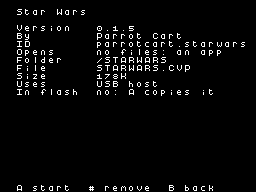
256 × 192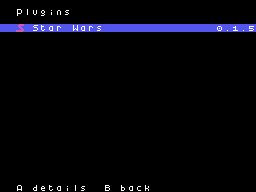
256 × 192README on the cart
This is what the cart shows for this plugin. It’s 135 lines long and 30 characters wide.
2,858 bytesPlain text
STAR WARS

This plugin plays Atari's 1983
Star Wars arcade game on the
ColecoVision. It needs your
own copy of the game's ROMs.

SETUP

1. Copy STARWARS.CVP into the
   /PLUGINS folder on the
   card.
2. Put the ROMs from MAME's
   starwars set in a folder
   named /STARWARS. You can
   copy the 13 files loose, or
   copy starwars.zip as it is.
   You can also put the zip in
   the card's top folder as
   /STARWARS.ZIP.
3. Start Star Wars from the
   Plugins page in the menu.

The files can have any names,
because the plugin knows each
ROM by its size and contents.
If a ROM is missing, the
screen names it. Only MAME's
starwars set works, not the
older starwars1 or starwarso
sets.

The game runs its own
self-test first, which takes
about five seconds.

CONTROLS

On the ColecoVision
controller:

- The joystick moves the yoke.
  The yoke springs back when
  you let go.
- Either fire button fires.
- Keypad 1 adds a coin.
- Keypad 2 starts the game.
  Fire starts it too.
- Keypad 0 swaps up and down.
- Press RESET on the console
  to go back to the menu.

On a USB pad, through a
powered hub:

- The left stick moves the
  yoke. The D-pad works too.
- Any face button, L, R, ZL or
  ZR fires.
- Minus adds a coin, and plus
  starts the game.
- Click the right stick, or
  press the capture button, to
  swap up and down.

At first, up on the stick aims
down, the way a flight stick
works. The plugin remembers
which way you left it.

About five seconds after the
game starts, the stick does
nothing for three seconds. The
plugin is moving the yoke to
both ends so the game can
learn its range.

SAVES

High scores and the game's
settings are saved in
/STARWARS/STARWARS.NV when you
press RESET. Press RESET
before you turn the console
off, or new high scores are
lost.

CREDITS

Parts of this plugin are ports
of MAME's code, or were
checked against it. That code
is under the BSD-3-Clause
license, and its authors are:

- Steve Baines and Frank
  Palazzolo, for the Star Wars
  driver and the matrix
  processor.
- Mathis Rosenhauer, for the
  vector generator, with
  thanks to Eric Smith, Brad
  Oliver, Bernd Wiebelt, Aaron
  Giles and Andrew Caldwell.
- Frank Palazzolo, Aaron
  Giles, Jonathan Gevaryahu,
  Raphael Nabet, Couriersud
  and Michael Zapf, for the
  TMS5220 speech chip.
- Curt Coder, smf, Barry
  Rodewald and Dirk Best, for
  the RIOT, X2212 and ADC0809
  chips.
- Nathan Woods, for the 6809
  CPU.
- Brad Oliver, Eric Smith and
  Juergen Buchmueller, for the
  POKEY sound chip.

You can find MAME at
https://www.mamedev.org. The
zip reader follows Mark
Adler's puff, from zlib. USB
support comes from TinyUSB by
Ha Thach, under the MIT
license.

The plugin itself is by Parrot
Cart, and it's free. Its
source is linked next to its
download.

Star Wars is a trademark of
Lucasfilm Ltd. This plugin
contains none of the game.
README
This is the README.md from release v0.1.5. Images show up as links.
Star Wars
This plugin plays Atari’s 1983 Star Wars arcade game on the ColecoVision. It needs your own copy of the game’s ROMs.
Setup
- Copy
STARWARS.CVPinto the/PLUGINSfolder on the card. - Put the ROMs from MAME’s
starwarsset in a folder named/STARWARS. You can copy the 13 files loose, or copystarwars.zipas it is. You can also put the zip in the card’s top folder as/STARWARS.ZIP. - Start Star Wars from the Plugins page in the menu.
The files can have any names, because the plugin knows each ROM by its size and contents. If a ROM is missing, the screen names it. Only MAME’s starwars set works, not the older starwars1 or starwarso sets.
The game runs its own self-test first, which takes about five seconds.
Controls
On the ColecoVision controller:
- The joystick moves the yoke. The yoke springs back when you let go.
- Either fire button fires.
- Keypad 1 adds a coin.
- Keypad 2 starts the game. Fire starts it too.
- Keypad 0 swaps up and down.
- Press RESET on the console to go back to the menu.
On a USB pad, through a powered hub:
- The left stick moves the yoke. The D-pad works too.
- Any face button, L, R, ZL or ZR fires.
- Minus adds a coin, and plus starts the game.
- Click the right stick, or press the capture button, to swap up and down.
At first, up on the stick aims down, the way a flight stick works. The plugin remembers which way you left it.
About five seconds after the game starts, the stick does nothing for three seconds. The plugin is moving the yoke to both ends so the game can learn its range.
Saves
High scores and the game’s settings are saved in /STARWARS/STARWARS.NV when you press RESET. Press RESET before you turn the console off, or new high scores are lost.
Credits
Parts of this plugin are ports of MAME’s code, or were checked against it. That code is under the BSD-3-Clause license, and its authors are:
- Steve Baines and Frank Palazzolo, for the Star Wars driver and the matrix processor.
- Mathis Rosenhauer, for the vector generator, with thanks to Eric Smith, Brad Oliver, Bernd Wiebelt, Aaron Giles and Andrew Caldwell.
- Frank Palazzolo, Aaron Giles, Jonathan Gevaryahu, Raphael Nabet, Couriersud and Michael Zapf, for the TMS5220 speech chip.
- Curt Coder, smf, Barry Rodewald and Dirk Best, for the RIOT, X2212 and ADC0809 chips.
- Nathan Woods, for the 6809 CPU.
- Brad Oliver, Eric Smith and Juergen Buchmueller, for the POKEY sound chip.
You can find MAME at https://www.mamedev.org. The zip reader follows Mark Adler’s puff, from zlib. USB support comes from TinyUSB by Ha Thach, under the MIT license.
The plugin itself is by Parrot Cart, and it’s free. Its source is linked next to its download.
Star Wars is a trademark of Lucasfilm Ltd. This plugin contains none of the game.
Build it yourself
You need the Raspberry Pi Pico SDK 2.1.1, an Arm GNU toolchain, CMake, Ninja, Python 3, sjasmplus and picotool. Releases are built with the Arm GNU Toolchain 9-2019-q4 (GCC 9.2.1) and picotool 2.3.1. With those you get the same file, byte for byte.
cmake -B build -G Ninja -DPICO_SDK_PATH=$HOME/pico-sdk
ninja -C build
This makes build/STARWARS.CVP. Copy it into the /PLUGINS folder on the card.
On Ubuntu, tools/ci/setup.sh installs the same tools that GitHub uses to
build each release.
CART-README.md is the text the cart shows on the plugin’s page. It is
the start of this README.
License
The plugin is under the BSD 3-Clause license (LICENSE). THIRD-PARTY.md
lists the parts that came from elsewhere, and their licenses.
Release details
We read these from GitHub when the plugin was listed.
- Release
v0.1.5, 2026-11-19- Image
- 177,920 bytes, loaded into RAM
- Plugin API
1- Source
- Code at
v0.1.5 - Credits
- Parts of this plugin are ports of MAME’s code, or were checked against it. That code is under the BSD-3-Clause license, and its authors are:; Steve Baines and Frank Palazzolo, for the Star Wars driver and the matrix processor.; Mathis Rosenhauer, for the vector generator, with thanks to Eric Smith,…
- SHA-256
- b9fc27361d7dc6a87c5e344578e8ad9ecf25c1faddd9805244f30dcd811c7526
The code
Every plugin here has a public repo on GitHub, so you can read how it works.
Release notes
The newest version is first.
Put it on your cart
Download STARWARS.CVP
The SHA-256 is above if you want to check the file.
Copy it to /PLUGINS
That folder is on the cart’s microSD card.
Start it
Press B for Home, open Apps, pick Star Wars and press A.